 Printhawk
Report a problem to Prodigi
Updated
When a customer sends you a photo of a crushed frame, you can open a ticket with Prodigi from the order itself.
Steps
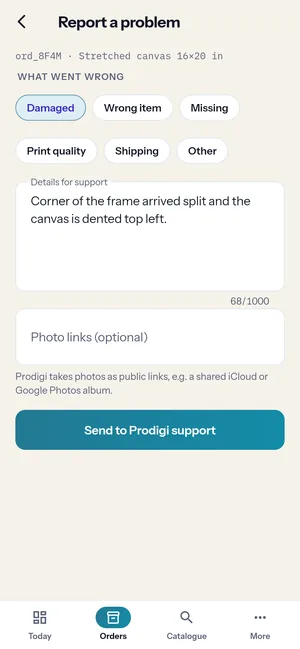
- Open the order and tap Report a problem (or Report to Prodigi on a flagged parcel).
- Choose what went wrong: Damaged, Wrong item, Missing, Print quality, Shipping or Other.
- Add details for support (up to 1,000 characters): which item, what you can see, what the customer said.
- Paste photo links (optional): public
https://links, up to 10, separated by spaces or commas. - Tap Send to Prodigi support, check the sheet and confirm with Face ID.
- Printhawk shows the ticket number with Copy number. Prodigi replies by email.
Rules
- Printhawk Pro; hidden in read-only mode.
- Available from production onwards (in production, shipped, completed, on hold or failed).
- Printhawk doesn’t upload images; links must be public so Prodigi can open them.
What Prodigi asks for, and how reprints work: reporting a damaged Prodigi order and returns and reprints.
Questions
Can I attach photos?
As links. Prodigi's API takes photos as public URLs, up to 10, not uploaded files. A shared iCloud or Google Photos album link from the customer works.
When can I report a problem?
Once the order has reached production: in production, shipped, partly shipped or completed, and also on hold or failed.
How do I follow up?
Prodigi replies by email. Printhawk shows the ticket number when it's created so you can quote it; the ticket's later status isn't available through the API.
What reasons can I choose?
Damaged, Wrong item, Missing, Print quality, Shipping or Other. Other needs a description.