 Printhawk
Prodigi invoices: how billing works and how to download them
Updated
Prodigi invoices are in the dashboard under Settings, Billing, Invoices, as PDF or CSV, one at a time or in bulk. Invoice numbers start PWI-. Most merchants pay per order by card or PayPal; high-volume accounts can be invoiced weekly or monthly by Direct Debit. Refunds appear on separate credit notes.
How Prodigi bills you
- Per order (the default): you register a card (Visa, Mastercard, Amex) or PayPal, and Prodigi charges when an order is submitted for fulfilment. You can’t have both a card and PayPal on file.
- Weekly or monthly invoicing: available to approved merchants after a credit check (ask
[email protected]). It requires Direct Debit (Bacs in the UK, SEPA in the EU, ACH in the US) plus a backup card or PayPal. - Currency: orders made abroad are priced in the lab’s local currency and converted to your default currency at the moment the order is placed.
If a payment fails, orders go on hold until it clears.
Downloading invoices
In the dashboard, go to Settings, Billing, Invoices. Prodigi’s FAQ says you can filter by last month, last three months, this year or a custom range; download an invoice as PDF or CSV; or select several and get a ZIP of PDFs or one combined CSV. Older invoices may be available only as CSV, or not at all; ask [email protected] if one is missing.
Through the API, GET /billing/invoices lists invoices newest first (filter with issuedAfter and issuedBefore). GET /billing/invoices/{id}/download?format=pdf|csv|credit_note redirects to the file, and POST /billing/invoices:downloadLinks returns links for up to 100 invoices at once. Links expire after about 15 minutes, so don’t store them. Files are named PWI-{number}.pdf, .csv or -CN.pdf.
Invoice statuses
| Status | Meaning |
|---|---|
generated | Issued, not yet sent or paid. |
sent | Sent to you for payment. |
payment_pending | A payment has started but not cleared. |
paid | Paid in full. |
cancelled | Withdrawn; nothing owed. No files. |
error | Couldn’t be processed; contact support. No files. |
What is on an invoice, and what isn’t
- PDF: the charges. Credit note PDF: the refunds (most invoices have none). Transaction CSV: both, line by line, for invoices issued from 5 December 2024.
- Several invoices per order: Prodigi splits by tax region (EU; Canada; UK, USA and rest of world) and separates US from non-US orders. The total is the same.
- Tax: VAT or US sales tax depends on where items are made and delivered and on your tax details. See tax settings.
- Per order: each order’s
chargesshow the invoice number once billing is finalised (nullbefore).
For bookkeeping, the CSV is the most useful file: it ties each charge to an order. Prodigi’s order export (Orders, All orders, Export) also includes the invoice number where one exists.
Invoices on your phone
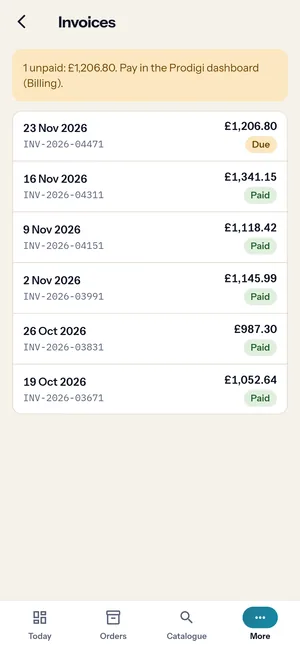
Printhawk lists Prodigi invoices with their status and due date, shows “invoice due” on the Today screen, and opens the PDF (Pro). See invoices in Printhawk.
Questions
Where do I download Prodigi invoices?
In the Prodigi dashboard under Settings, Billing, Invoices. You can filter by date, download single invoices as PDF or CSV, or select several to get a ZIP of PDFs or one combined CSV.
Why did I get several Prodigi invoices for one order?
Prodigi splits invoices by tax region (EU, Canada, and UK/USA/rest of world) depending on where items are made, and separates US and non-US orders. The total charged is the same.
How do I pay Prodigi?
By Visa, Mastercard, American Express or PayPal, per order. Merchants approved for weekly or monthly invoicing pay by Direct Debit in the UK, EU or US, with a card or PayPal as backup.
What does a Prodigi credit note contain?
Refunds. The invoice PDF lists charges and the credit note PDF lists refunds; most invoices have no credit note. The transaction CSV covers both.
Sources
- Prodigi Print API v5 reference: Invoice, InvoiceStatus, InvoiceDownloadLinks, /billing/invoices endpoints, Order.charges (prodigi.com/print-api/docs), read 27 November 2026.
- Prodigi FAQ, Payments & pricing and Taxation (“Why have I received multiple invoices for my order?”) (prodigi.com/faq), read 27 November 2026.