 Printhawk
Prodigi order on hold: why, and how to release it
Updated
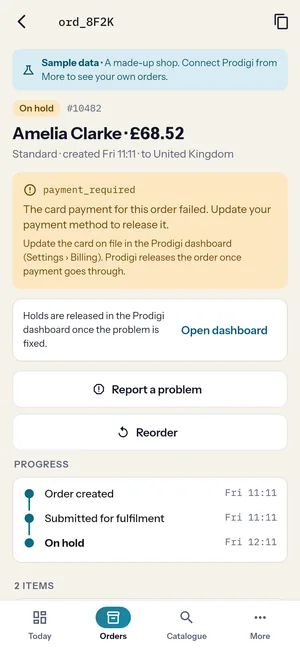
“On hold” means Prodigi has stopped the order before production, most often because a payment failed. You can’t release it with the API’s resume action (that is for the edit window). Fix the cause, usually the card on file in the Prodigi dashboard, and Prodigi releases the order.
What “on hold” means
Every Prodigi order has a status. Most move forward on their own: submitted, in_production, shipped, completed. Two statuses mean the order is waiting:
paused: the order is sitting in your edit window, the delay you can set in your Prodigi account so you have time to fix mistakes. You control this one.on_hold: Prodigi has held the order. Prodigi’s Print API documentation gives a payment problem as the example. You can’t release this one with an API call.
The order keeps its place: nothing is printed or charged for production while it is held, and once the hold is lifted it carries on as normal.
How to release an order on hold
- Read the reason. Open the order in the Prodigi dashboard. If the order carries an issue such as
payment_required, that is the cause. In Printhawk the reason is shown at the top of the order in plain words. - Fix the payment. If a card payment failed, update the payment method in your Prodigi account’s billing settings and settle anything outstanding.
- Check other held orders. A failed payment usually holds every order placed while it was failing, not just one.
- Contact Prodigi support if the order is still on hold after the payment has gone through, or if there is no reason you can see. Quote the order ID.
If you can’t fix the cause soon, you can also cancel the order when Prodigi allows it, and place it again later.
On hold vs paused vs failed
| Status | Who stopped it | What you do |
|---|---|---|
paused | Your edit window | Wait, edit it, or send it to the lab early (resume) |
on_hold | Prodigi (e.g. payment) | Fix the cause in the dashboard; Prodigi releases it |
failed | Validation or fulfilment problem | Read the issue, fix the artwork or details, place it again (failed orders) |
Seeing holds before your customer does
Holds are easy to miss because nothing tells the customer, and nothing ships. The dashboard lists the status on each order; through the API you can list held orders with GET /orders?status=on_hold. Prodigi's v5 specification also describes webhook events, but on 27 November 2026 Prodigi's own FAQ said webhook subscriptions weren't yet available in v5 (see Prodigi webhooks). Printhawk puts held and failed orders at the top of its Today screen with the reason.
Questions
What does on hold mean on a Prodigi order?
Prodigi has stopped the order from going into production until something is resolved. Prodigi's API documentation describes on_hold as a hold by Prodigi, such as a payment problem.
Can I release an on hold order myself through the API?
No. The resume action only releases orders from your own edit window (status paused). An on hold order is released by Prodigi once the cause is fixed, so fix the cause in the dashboard or contact Prodigi support.
What is the difference between on hold and paused?
Paused means the order is waiting in the edit window you set in your account settings; you can send it on early. On hold means Prodigi itself has stopped it, usually because of payment.
Will an on hold order ship late?
Production starts only after the hold is lifted, so the delivery date moves back by however long the order was held. Tell the customer if the delay is more than a day.
Sources
- Prodigi Print API v5 reference: OrderStatus (on_hold, paused, resume), ValidationIssue codes, webhook event types (prodigi.com/print-api/docs), read 27 November 2026.
- Prodigi Print API FAQ: webhook subscriptions in v5 (prodigi.com), read 27 November 2026.
- Prodigi dashboard, dashboard.prodigi.com (billing settings).