 Printhawk
The Prodigi order edit window (order pausing)
Updated
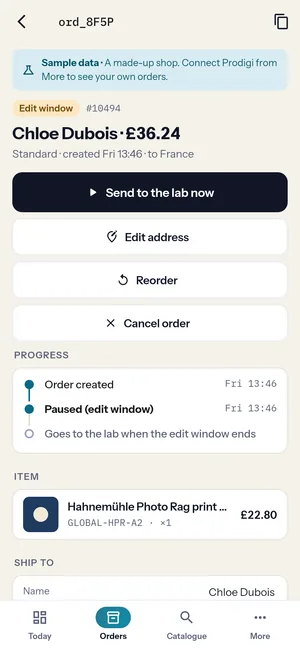
The edit window is a delay you set in your Prodigi account (2, 6 or 24 hours, a custom time up to 48 hours, or until you release it) between an order being submitted and going to the lab. While it waits, the order is paused: you can fix it or cancel it free, or send it early.
Why the edit window exists
Automatic fulfilment is fast, which is the problem when a customer emails ten minutes later with a typo in their address. Prodigi added order pausing in May 2024 so merchants have a grace period before anything is printed or charged. Prodigi’s own reasoning: fewer reprints, fewer wasted products and fewer refunds. It also matters for personalised products, where the order often arrives before the artwork is ready.
The settings
Set it in the Prodigi dashboard under Account, Preferences. Prodigi’s FAQ and announcement list these options:
| Option | What happens |
|---|---|
| None, process immediately | The default. Orders go to production straight away. |
| 2 hours, 6 hours, 24 hours | Orders wait that long, then go to production automatically. |
| Custom | Any delay from 5 minutes to 48 hours. |
| Pause indefinitely | Orders wait until you release them. Good for personalised items. |
The window applies to every submitted order: there is no per-order pause. Through the Print API v5 the same setting is orderEditWindow (enabled and durationMinutes) on GET/PATCH /merchant/settings.
What you can do while an order is paused
In the dashboard, Prodigi lists these actions during the window:
- Cancel the order (no charge).
- Submit it now, skipping the rest of the delay (“Send now”).
- Edit the product SKU, image, shipping speed, delivery address (not the country) and the customer’s email and phone.
- Manage branded inserts, and add or remove line items.
Anything else means cancelling and creating a new order. Through the API the rules are tighter: once an order is submitted, paused included, only the recipient can be changed with PATCH /orders/{orderId}. Changing the destination country returns 400. To change items or artwork through the API, cancel and re-create.
Sending a paused order early
When you are sure the order is right, release it. In the dashboard, open the order and press “Send now”. Through the API, call POST /orders/{orderId}:resume; it works only when the order’s allowedActions includes resume. That is the case for orders in your own pause window, not for orders on hold for payment or artwork problems, which return 409 until the problem is fixed. Printhawk shows the same button on a paused order, asks you to confirm with Face ID, and only offers it when Prodigi does (a Pro feature; see sending an order early).
Charges and cancellations
Prodigi charges when the order is submitted for fulfilment, whether you pay per order or are invoiced weekly or monthly. So a paused order costs nothing until it leaves the window, and cancelling it costs nothing. Once it is in production, Prodigi says you can still cancel, but you will be charged for the product and refunded at most the unused shipping. That is the main reason to keep a window: it is your free cancellation period. See cancelling a Prodigi order.
Choosing a length
- Two hours catches most “I typed my address wrong” emails without slowing delivery much.
- 24 hours suits shops that check every order by hand once a day, or sell to markets with a legal cooling-off expectation.
- Indefinitely suits personalised products, where you add the artwork later. Remember to release them, or nothing ships.
Every hour of pause adds an hour to delivery, so tell customers your dispatch time includes it.
Questions
How long can I pause a Prodigi order?
Prodigi offers presets of 2, 6 or 24 hours, a custom delay from five minutes up to 48 hours, or pausing indefinitely until you release the order yourself. The default is no pause.
Am I charged while a Prodigi order is paused?
No. Prodigi charges when the order is submitted for fulfilment, after the window ends or when you release it early. Orders cancelled during the window are not charged.
Can I change the artwork on a paused order?
In the dashboard, Prodigi says you can edit the SKU, image, shipping speed, address (not the country) and contact details while paused. Through the v5 API, only the recipient can be changed after submission, paused or not.
Why does my paused order say Submitted?
The dashboard shows paused orders with the status Submitted and a slightly longer order ID. In the API the same order has the status paused.
Sources
- Prodigi FAQ, Ordering: order pausing questions (prodigi.com/faq/ordering), read 27 November 2026.
- Prodigi blog, “Maximise control & minimise mistakes with our new order pausing feature”, 2 May 2024, updated 22 May 2024 (prodigi.com/blog/order-pausing-feature), read 27 November 2026.
- Prodigi Print API v5 reference: OrderStatus, MerchantSettings.orderEditWindow, PATCH /orders/{orderId}, POST /orders/{orderId}:resume (prodigi.com/print-api/docs), read 27 November 2026.
- Prodigi blog, “What’s new in Prodigi API v5”, 2 November 2026 (prodigi.com/blog/whats-new-in-api-v5), read 27 November 2026.