 Printhawk
Prodigi order statuses: what each one means and what to do
Updated
A Prodigi order moves from draft to submitted, in_production, shipped and completed. Two statuses mean it is waiting: paused (your own edit window) and on_hold (held by Prodigi, usually payment). cancelled and failed are final. Only paused, on hold and failed need you to act.
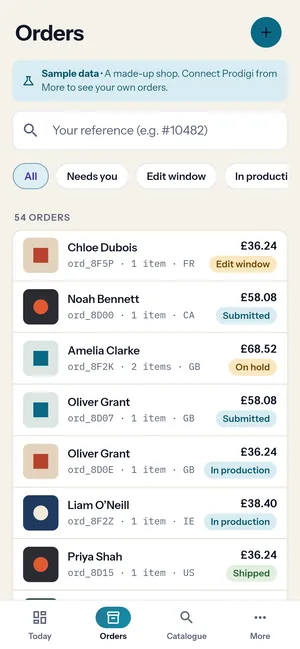
Every Prodigi order status
These are the eleven statuses in Prodigi’s Print API v5, in the order an order normally meets them. The dashboard uses friendlier names for some of them (see the next section).
| Status | What it means | What you do |
|---|---|---|
draft | Created but not submitted. Nothing is charged or printed. | Add items, artwork and a recipient, then submit. |
pending_submission | You asked for submission at creation; it is queued or being validated. | Wait a few seconds and read the order again. |
submitted | Accepted for fulfilment, not yet seen in production. | Nothing. You can still try to change the address or cancel. |
paused | Waiting in the edit window you set in your account. | Edit, cancel, or send it to the lab early. See the edit window. |
on_hold | Held by Prodigi, for example a payment problem. | Fix the cause. See order on hold. |
in_production | Being made at a lab. | Watch the production stages. Cancelling now is usually charged. |
partially_shipped | Some parcels have left the lab. | Share the tracking you have; the rest follows. |
shipped | All parcels have left the lab. | Send tracking to the customer. See tracking. |
completed | Finished successfully. Final. | Nothing. |
cancelled | Cancelled by you or Prodigi. Final. | Re-order if you still need it. |
failed | Could not be fulfilled. Final. | Read the issue, fix and re-order. See failed orders. |
Dashboard names vs API names
The dashboard and the API don’t always use the same words, which causes most of the confusion. Prodigi’s own FAQ says:
- “Submitted” in the dashboard covers orders that are paused in your edit window. They also show a slightly longer order ID. In the API these are
paused. - “Requires attention” appears when there is a problem with the order, and Prodigi sends an error email. In the API, look at the order’s
issueslist and its status (on_hold,failedor adraftcarrying afulfilment_issue). - “In production” means the order has been allocated to a print facility. Prodigi says an order can still be cancelled at this point, but you will be charged.
Issues travel with the status
A status tells you where the order is; the issues list tells you why it stopped. Each issue has a code, a message and a severity (warning or error). The two that stop orders most often are payment_required (the charge could not be taken: no card, declined, or authorisation needed) and fulfilment_issue (anything else blocking fulfilment). Prodigi’s reference warns that an order can be accepted and still carry an issue, so don’t treat “accepted” as “progressing”.
Item-level statuses exist too: each item is not_yet_downloaded, ok, in_production, shipped, cancelled or invalid, and each artwork file is not_yet_downloaded, in_progress, complete or error. An artwork error is the usual reason an item is invalid (see artwork errors).
What “allowed actions” adds
Each order also lists the actions you may attempt right now in allowedActions: submit, cancel, resume and update. They are a better guide than the status alone. A paused order normally offers resume, update and cancel; an order held for payment does not offer resume. Even when an action is listed, Prodigi can still refuse it if production has moved on, so handle a 409 reply.
Watching statuses without refreshing
In the dashboard, filter the Orders page by status. Through the API, GET /orders?status=paused (or any status) lists matching orders, and GET /orders/{orderId}/events gives the full history. Printhawk reads the same data and puts held, failed and paused orders at the top of its Today screen, with the reason in plain words, so a stuck order doesn’t wait for the customer to ask.
Questions
What does submitted mean on a Prodigi order?
In the Print API, submitted means Prodigi has accepted the order for fulfilment. In the dashboard, Prodigi's FAQ says a paused order (one in your edit window) is also shown as Submitted, so check whether a pause window is set.
What is the difference between paused and on hold?
Paused means the order is waiting in the edit window you set in your account; you can send it on early. On hold means Prodigi has stopped it, usually over payment, and it moves on once the cause is fixed.
Can a Prodigi order go backwards from submitted to draft?
Yes. If you create an order with submit: true and Prodigi refuses it, the API documents that it returns to draft with a fulfilment_issue on the order. Read the issue, fix the order and submit it again.
When is a Prodigi order completed?
Completed is the final success status, after the order's parcels have shipped. Partially shipped means some parcels have left the lab and others have not yet.
Which Prodigi statuses are final?
Completed, cancelled and failed. A cancelled or failed order will not move again; place a new order if you still need the items printed.
Sources
- Prodigi Print API v5 reference: OrderStatus, OrderItemStatus, OrderItemAssetStatus, Order.issues and allowedActions (prodigi.com/print-api/docs), read 27 November 2026.
- Prodigi FAQ, Ordering: “What do your order statuses mean?” and “How will paused orders appear in my dashboard?” (prodigi.com/faq/ordering), read 27 November 2026.
- Prodigi blog, “How to migrate from v4 to v5 of our print API”, 2 November 2026 (prodigi.com/blog/how-to-migrate-from-api-v4-to-v5), read 27 November 2026.