 Printhawk
Prodigi order failed or refused: why, and how to fix it
Updated
A failed Prodigi order could not be fulfilled, usually because of artwork (missing, too small, wrong shape) or order details (an invalid address or SKU). The order’s issue list says which. failed is final: fix the cause and place the order again. A refused draft can be fixed and resubmitted.
Failed, refused and on hold are different
Prodigi has three ways of telling you an order is stuck, and each needs a different fix:
| What you see | Meaning | Fix |
|---|---|---|
failed | Terminal. The order will not be made. | Correct the cause, create a new order. |
draft with a fulfilment_issue | You submitted it (for example with submit: true) and Prodigi refused it. | Correct the draft and call :submit again. Don’t create a second order. |
on_hold with payment_required | Held until the charge goes through. | Fix billing. See order on hold. |
In the dashboard, any of these can appear as “Requires attention”, with an error email. In the API, read the order’s status and its issues list.
The issue codes
Every issue Prodigi reports has a code, a message, a severity (warning or error) and often the field or printArea it concerns. The codes in the v5 reference:
| Code | Usually means |
|---|---|
resolution_low, resolution_insufficient | The image has too few pixels for the print size. |
aspect_mismatch | The image shape doesn’t match the print area, so it will crop or border. |
print_area_unfilled | The artwork doesn’t cover the print area. |
asset_missing | A required print area has no artwork, or the file couldn’t be fetched. |
required_field, invalid_format, out_of_range, invalid_enum_value | A field is missing or wrong, for example the postcode or country code. |
not_available_for_account | That product or option isn’t available to your account. |
payment_required | The charge failed; the order is held. |
fulfilment_issue | Anything else blocking fulfilment; read the message. |
The artwork codes have their own guide: Prodigi artwork errors.
The most common causes, and fixes
- Artwork URL not reachable. Prodigi downloads the file from the URL you give. If it is private, expired (a signed link) or behind a login, the asset goes to
error. Use a public URL that stays live until the order ships. - Image too small. Work out the pixels the print size needs at the print area’s recommended dpi (our pixels to inches table helps) and supply a bigger file.
- Wrong file type. Prodigi’s FAQ says the API takes JPG, PNG or PDF, and most products want JPG or PNG.
- Address fields. Country codes must be two letters (
GB, notUKorGBR); line 1, town and postcode are required. - Photo books. A page count that doesn’t match the file puts the order on hold until it is corrected.
- Store orders. An Etsy or Shopify product that was never configured, or was re-created after an edit, won’t fulfil. See sync errors.
Catching failures early
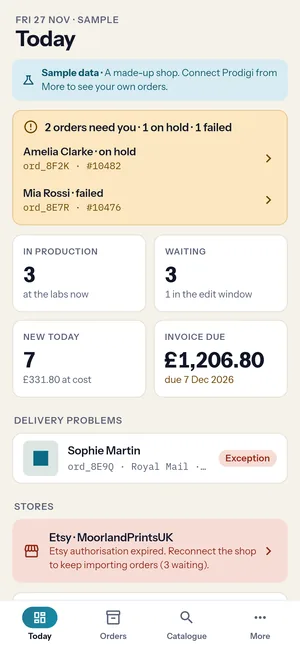
Validate before you submit: create the order as a draft and read its issues, or check a file against a SKU’s print area with POST /assets/{assetId}/validate. Keep the order-failed email switched on (emailNotifications.orderFailed in the merchant settings). Printhawk lists failed and held orders first on its Today screen, and its reorder button (Pro) rebuilds a failed order with a fresh quote once you have fixed the cause.
Questions
Can I resubmit a failed Prodigi order?
No. Failed is a final status. Fix the cause, usually the artwork or address, and place a new order. If the order was refused at submission and went back to draft instead, you can fix the draft and submit it again.
Am I charged for a failed Prodigi order?
Prodigi charges when an order is submitted for fulfilment. Check the order's charges in the dashboard or the API; if you are unsure whether you were charged for a failed order, ask Prodigi support with the order ID.
Does Prodigi email me when an order fails?
Yes. The dashboard marks the order Requires attention and Prodigi sends an error email. You can turn the order-failed email on or off in your account notification settings.
What is a fulfilment_issue?
It is the catch-all issue code for anything other than payment that blocks fulfilment. The issue's message says what is wrong; read it before contacting support.
Sources
- Prodigi Print API v5 reference: OrderStatus, ValidationIssue codes, Order.issues, POST /orders (submit outcomes), POST /assets/{assetId}/validate, MerchantSettings.emailNotifications (prodigi.com/print-api/docs), read 27 November 2026.
- Prodigi FAQ, Ordering (“Requires attention”) and Print API (file types, photo book page counts) (prodigi.com/faq), read 27 November 2026.